DeepSkyHosting

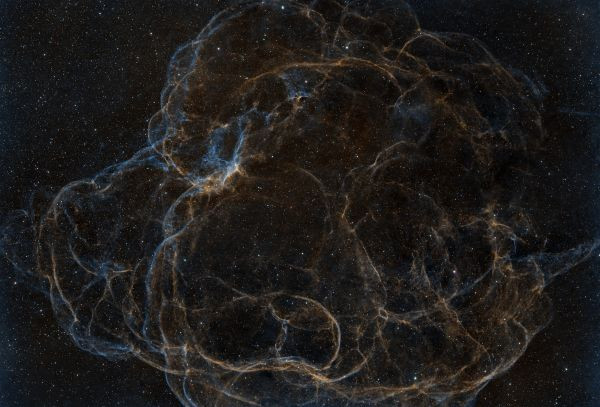
M20 Trifid

UrmasX
2532983
Category:Deep Sky
Published:
1588
M20 TrifidNGC 6514
Resolution:
1821x2085 px
File size:
2353 KB

Photo description / processing

Collected bit by bit over 6 nights, but oxygen never appeared...

Technical information

Telescope/Lens
Custom Newtonian 6-inch f/4
Camera
Player One Uranus-C Pro
Mount
ZWO AM5
Guide Scope
Off-Axis Guider
Guide Camera
Player One Sedna-M
Accessories
Sharpstar 0.95x 2-inch Coma Corrector, Autofocuser
Software
N.I.N.A., Siril, StarNet++, GraXpert
Location
Хоста, Сочи, Россия

Light pollution

Orange, Bortle 6 zone

Date taken

Exposure

  • 113 × 180″ · ISO/Gain: 0 · фильтр Antlia ALP-T ·

Total exposure: 5 h 39 m
Comments

Oleg Novoselov
You shouldn't be shooting with this camera and this filter at 0 gain. You need to set it to 210 or a bit higher, where the step is on the graph. With this filter, 5-minute exposures are fine; you won't overexpose.
Reply

Sign up or sign in to leave a comment.

UrmasXReply to Oleg Novoselov
Possibly. The step is at 180 or 181, if the graphs are to be believed.
The object was low on the horizon. Conditions were so-so. The guide periodically lost stars, so I didn't risk 5-minute exposures.
Reply

Sign up or sign in to leave a comment.

Oleg Novoselov
We go to the player's website, look at the graphs... We see that Gain 1 matches the HGG mode, and this gain is 210. Noise drops from 7.5 to 1. The full well capacity, of course, also drops to 4200, but the dynamic range hardly changes. Therefore, the advice is to shoot almost everything in this mode. Just if the object is very bright, use a shorter exposure. I would even shoot galaxies in this mode; the key here is to avoid overexposing the stars.
Reply

Sign up or sign in to leave a comment.

UrmasXReply to Oleg Novoselov
So that's what it is.
The graphs from the seller and on the player websites don't match.
It's planned to shoot at a gain of 210. But what offset is needed? In ASIAIR, there simply isn't such a setting...
Reply

Sign up or sign in to leave a comment.

Oleg NovoselovReply to UrmasX
Regarding offset calibration, close the optical scope and take the shortest exposure possible (enter 00 in NINA) and monitor the minimum values. If it continues to show 16, you are about to clip the dark areas; increase the offset until you see the "min" around 80-100 (or higher) and stabilizes at that level. Just keep taking offset frames and take more than a few to see if fewer than 16 pixels are clipped.
Reply

Sign up or sign in to leave a comment.

Oleg NovoselovReply to UrmasX
Regarding offset calibration, close the optical scope and take the shortest exposure possible (enter 00 in NINA) and monitor the minimum values. If it continues to show 16, you are about to clip the dark areas; increase the offset until you see the "min" value around 80–100 (or higher) and stabilizes at that level. Just keep taking offset frames and take more than a few to see if fewer than 16 pixels are clipped.
Reply

Sign up or sign in to leave a comment.

UrmasXReply to Oleg Novoselov
Do I need to perform this operation with the refrigerator turned on?
Reply

Sign up or sign in to leave a comment.

Oleg NovoselovReply to UrmasX
So, at what temperature do you usually shoot?
Reply

Sign up or sign in to leave a comment.

UrmasXReply to Oleg Novoselov
Thank you. I'll give it a try when the time comes.
Reply

Sign up or sign in to leave a comment.

More photos by UrmasX